本文章记录学习苍穹外卖的过程和遇到的问题。
首次接手苍穹外卖这个项目,可以发现并不是让我们从零开始建立的,我们是在一定基础上进行后续的功能开发的。并且提供了前端所有的源码以便于我们进行前后端联调测试,先把学习重心放到后端实现上来。
我首先关注到的是这个项目的结构,跟目录下分了3个包,分别是common(普通类)、pojo(实体类等)和server(业务逻辑类等),把前端用nginx启动后,直接在server包下的SkyApplication类启动这个项目。发现这个项目运行在本地的8080上,登录和登出功能已经是做好了的。
然后老师带我们进行了需求分析,导入需要实现的功能接口,老师演示的是Yapi导入的接口,由于它已经停止服务我便使用apifox进行了接口导入。
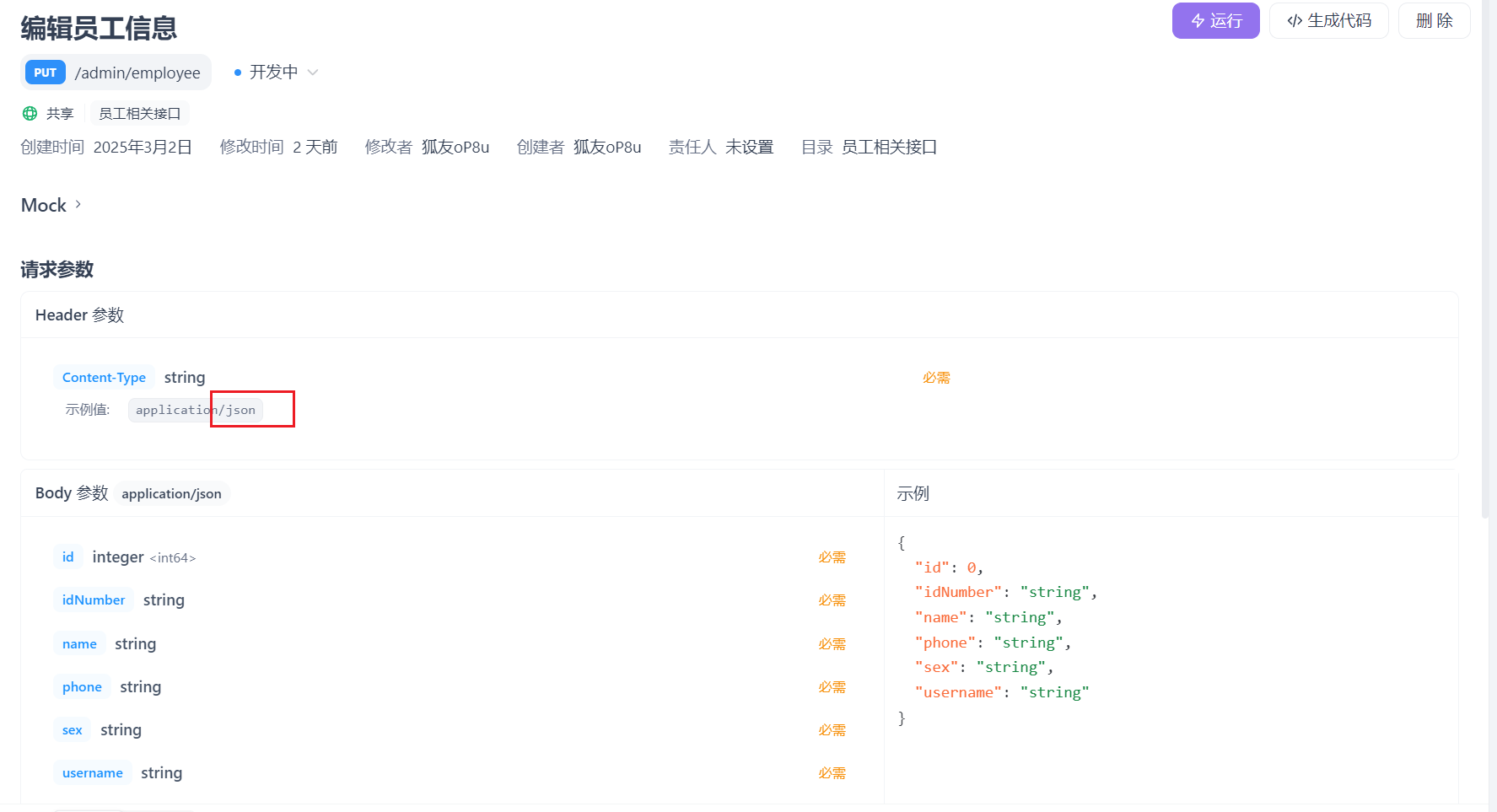
第一个功能->新增员工 查看接口
在控制层EmployeeController类新增一个方法作为对外的接口
1 2 3 4 5 6 7 8 9 10 11 12 @PostMapping @ApiOperation("新增员工") public Result save (@RequestBody EmployeeDTO employeeDTO) { log.info("新增员工: {}" , employeeDTO); employeeService.save(employeeDTO); return Result.success(); }
具体的实现交给业务逻辑层的employeeService接口和它的实现类,
1 2 3 4 5 6 7 8 9 10 11 12 13 14 15 16 17 18 19 20 21 22 23 24 @Override public void save (EmployeeDTO employeeDTO) { Employee employee = new Employee (); BeanUtils.copyProperties(employeeDTO, employee); employee.setStatus(StatusConstant.ENABLE); employee.setPassword(DigestUtils.md5DigestAsHex(PasswordConstant.DEFAULT_PASSWORD.getBytes())); employee.setCreateTime(LocalDateTime.now()); employee.setUpdateTime(LocalDateTime.now()); employee.setCreateUser(BaseContext.getCurrentId()); employee.setUpdateUser(BaseContext.getCurrentId()); employeeMapper.insert(employee); }
至于数据库的相关操作交给Mapper层处理
1 2 3 4 5 6 7 8 @Insert("insert into employee(name,username,password,phone,sex,id_number,create_time,update_time,create_user,update_user,status)" + "values " + "(#{name},#{username},#{password},#{phone},#{sex},#{idNumber},#{createTime},#{updateTime},#{createUser},#{updateUser},#{status})") void insert (Employee employee) ;
做了两个优化
问题有:
1.录入的用户名重复抛出的异常没有处理
2.新增员工的创建人id和修改人id设置为了固定值
第一个 查看控制台的报错,”Duplicate entry…”,在全局的异常处理器handler的GlobalExceptionHandler.java统一捕获处理异常
1 2 3 4 5 6 7 8 9 10 11 12 13 14 15 16 17 18 @ExceptionHandler public Result exceptionHandler (SQLIntegrityConstraintViolationException ex) { String message = ex.getMessage(); if (message.contains("Duplicate entry" )){ String[] split = message.split(" " ); String username = split[2 ]; String msg = username + MessageConstant.AlREDY_EXISTS; return Result.error(msg); }else { return Result.error(MessageConstant.UNKNOWN_ERROR); } }
第二个
生成jwt令牌的时候用到了用户的id,把它反解析出来
1 Long empId = Long.valueOf(claims.get(JwtClaimsConstant.EMP_ID).toString());
利用每一次请求都是同一线程的特点,使用ThreadLocal保存并在需要的时候调用即可。以下是这个类的信息:
1
2
3
4
5
6
7
8
9
10
11
12
13
14
15
16
17
18
19
package com.sky.context;public class BaseContext { public static ThreadLocal<Long> threadLocal = new ThreadLocal <>(); public static void setCurrentId (Long id) { threadLocal.set(id); } public static Long getCurrentId () { return threadLocal.get(); } public static void removeCurrentId () { threadLocal.remove(); } }
于是可以在生成jwt令牌时保存
1
2
3
4
Long empId = Long.valueOf(claims.get(JwtClaimsConstant.EMP_ID).toString());log.info("当前员工id:" , empId); BaseContext.setCurrentId(empId);
在实现类里面调用
1 2 3 4 employee.setCreateUser(BaseContext.getCurrentId()); employee.setUpdateUser(BaseContext.getCurrentId());
第二个功能员工分页查询 控制层EmployeeController类
1 2 3 4 5 6 7 8 9 10 11 12 @GetMapping("/page") @ApiOperation("员工分页查询") public Result<PageResult> page (EmployeePageQueryDTO employeePageQueryDTO) { log.info("员工分页查询,参数为:{}" ,employeePageQueryDTO); PageResult pageResult = employeeService.pageQuery(employeePageQueryDTO); return Result.success(pageResult); }
业务逻辑层的实现类EmployeeServiceImpl
1 2 3 4 5 6 7 8 9 10 11 12 13 14 15 16 17 18 @Override public PageResult pageQuery (EmployeePageQueryDTO employeePageQueryDTO) { PageHelper.startPage(employeePageQueryDTO.getPage(),employeePageQueryDTO.getPageSize()); Page<Employee> page = employeeMapper.pageQuery(employeePageQueryDTO); long total = page.getTotal(); List<Employee> records = page.getResult(); return new PageResult (total,records); }
数据库交互层EmployeeMapper类
1 2 3 4 5 6 Page<Employee> pageQuery (EmployeePageQueryDTO employeePageQueryDTO) ;
EmployeeMapper.xml
1 2 3 4 5 6 7 8 9 <select id ="pageQuery" resultType ="com.sky.entity.Employee" > select * from employee <where > <if test ="name != null and name != ''" > and name like concat('%',#{name},'%') </if > </where > order by create_time desc </select >
做了一个优化
问题是:前端显示的时间格式不美观
通过在WebMvcConfiguration中扩展Spring MVC的消息转换器,统一对日期进行格式化处理
1 2 3 4 5 6 7 8 9 10 11 12 13 protected void extendMessageConverters (List<HttpMessageConverter<?>> converters) { log.info("扩展消息转换器..." ); MappingJackson2HttpMessageConverter converter = new MappingJackson2HttpMessageConverter (); converter.setObjectMapper(new JacksonObjectMapper ()); converters.add(0 ,converter); }
具体格式在JacksonObjectMapper类中自定义。
第二天:
关于苍穹外卖的学习,今天继续添加功能
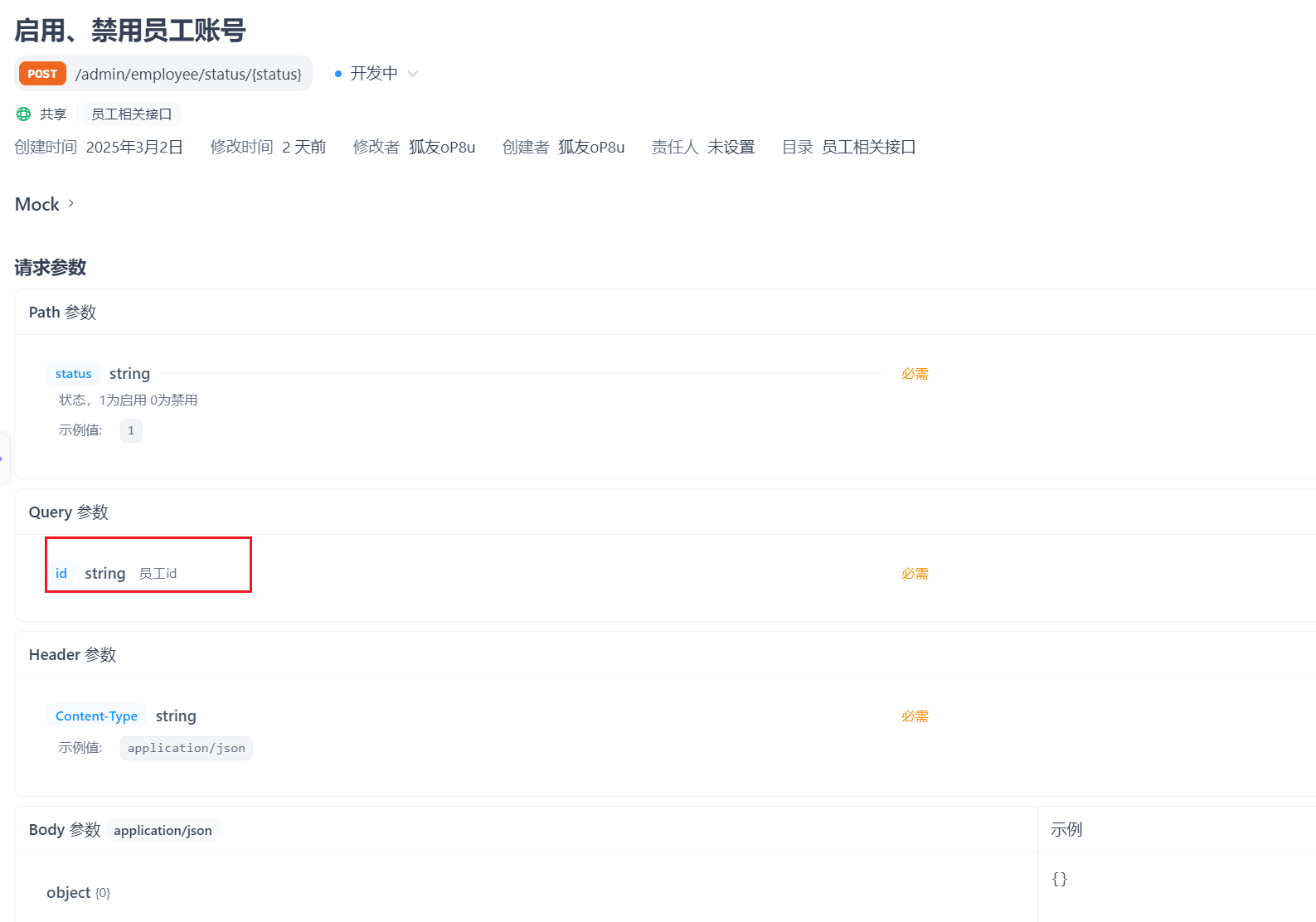
第一个功能启用/禁用员工账号 首先查看接口文档
在控制层写,路径参数注解后面的status可省略(在两者名字相同时),这个项目我们约定修改的返回值Result无需使用泛型,而查询的需要使用泛型。
1 2 3 4 5 6 7 8 9 10 11 @PostMapping("/status/{status}") @ApiOperation("启用禁用员工账号") public Result startOrStop (@PathVariable("status") Integer status, Long id) { log.info("启用禁用员工账号:{},{}" ,status,id); employeeService.startOrStop(status,id); return Result.success(); }
service层加接口,写实现类
1 2 3 4 5 6 7 8 9 10 11 12 13 14 15 16 17 18 19 20 21 public void startOrStop (Integer status, Long id) { Employee employee = Employee.builder() .status(status) .id(id) .build(); employeeMapper.update(employee); }
这里想着可能传递的参数不只是状态和id,也有可能是其他的,于是在持久层mapper里面写的update方法的形参是一个对象,包含了所有可能传递的参数。所以持久层mapper写:
1 2 3 4 5 void update (Employee employee) ;
它的具体实现由于是动态sql所以不用注解实现而是写在配置文件 EmployeeMapper.xml 里:
1 2 3 4 5 6 7 8 9 10 11 12 13 14 15 <update id ="update" parameterType ="Employee" > update employee <set > <if test ="name != null" > name = #{name},</if > <if test ="username != null" > username = #{username},</if > <if test ="password != null" > password = #{password},</if > <if test ="phone != null" > phone = #{phone},</if > <if test ="sex != null" > sex = #{sex},</if > <if test ="idNumber != null" > id_Number = #{idNumber},</if > <if test ="updateTime != null" > update_Time = #{updateTime},</if > <if test ="updateUser != null" > update_User = #{updateUser},</if > <if test ="status != null" > status = #{status},</if > </set > where id = #{id} </update >
特别注意: 这里的字段名字,数据库采用的是蛇形命名(如id_number),这里也需要加下划线变成id_Number。
最后提交推送分支。
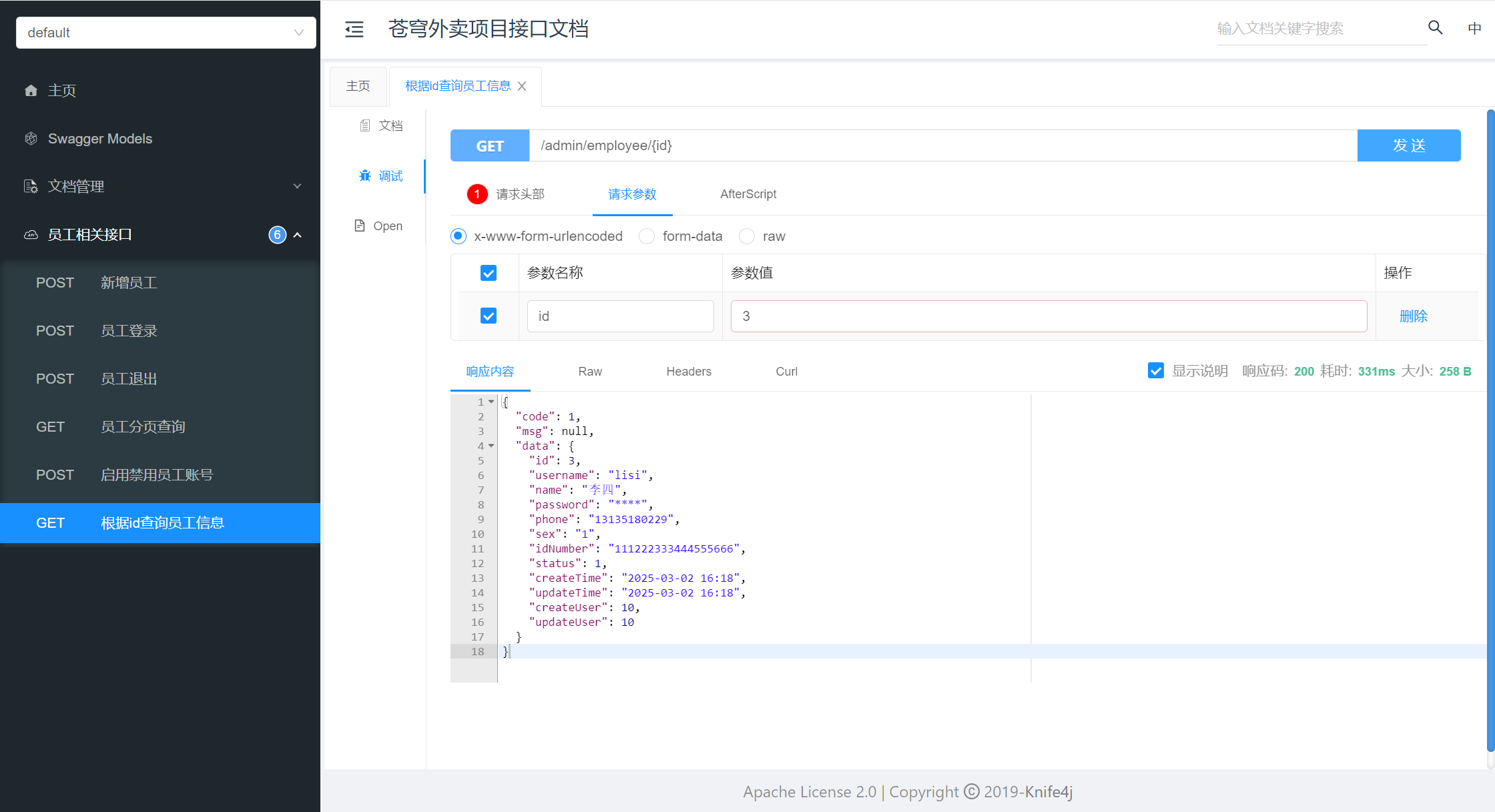
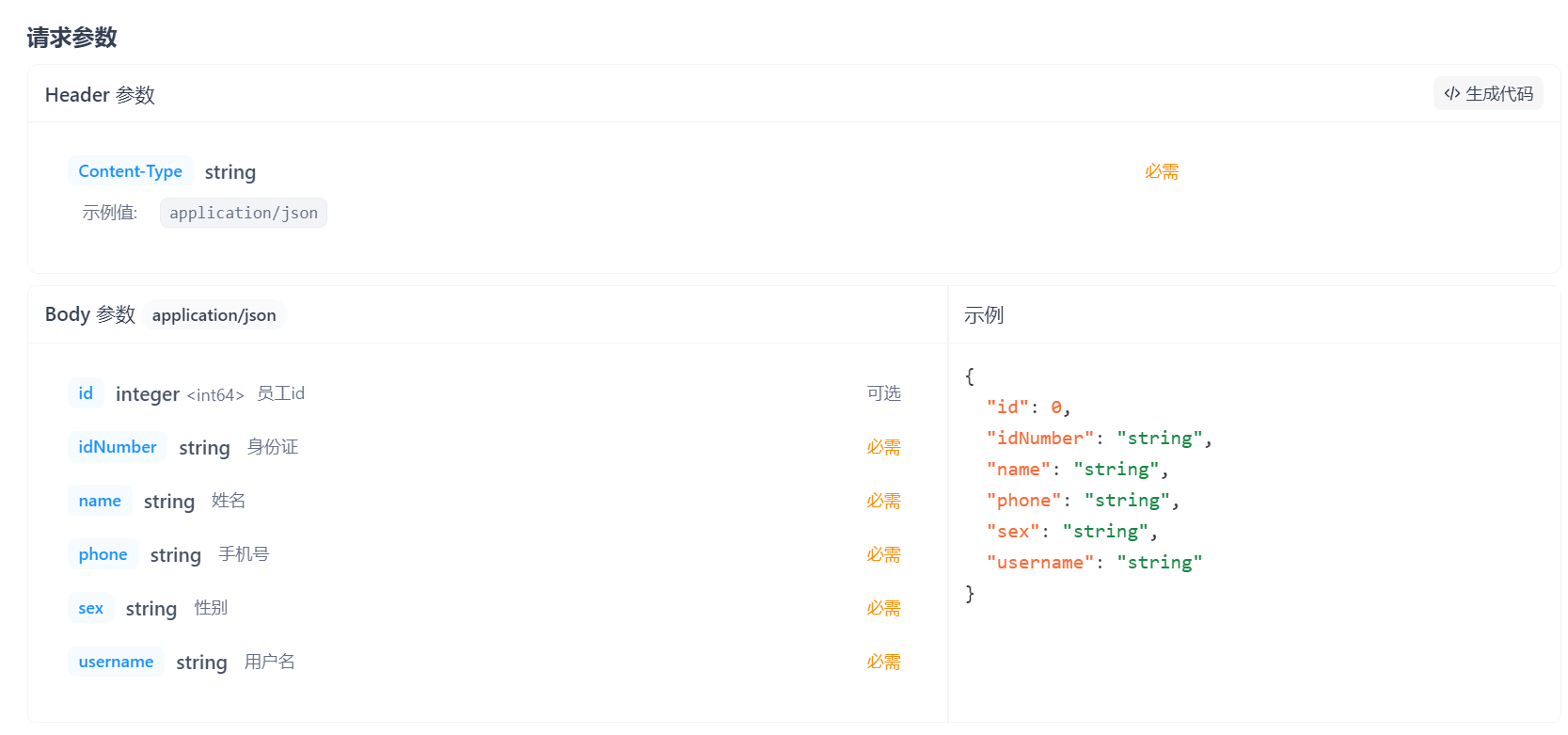
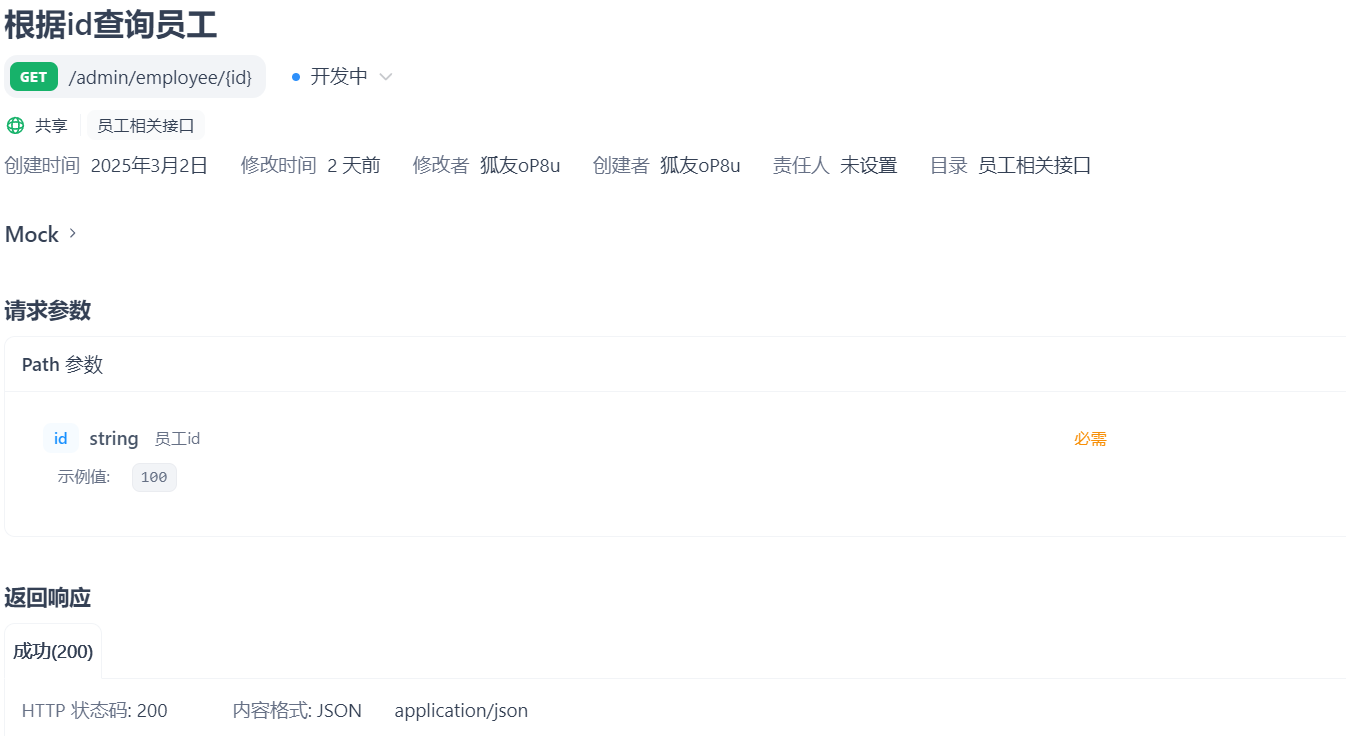
第二个功能编辑员工信息 涉及两个接口,一个是根据员工id查询员工信息,
第一个接口,控制层:
1 2 3 4 5 6 7 8 9 10 11 @GetMapping("/{id}") @ApiOperation("根据id查询员工信息") public Result<Employee> getById (@PathVariable Long id) { Employee employee = employeeService.getById(id); return Result.success(employee); }
业务逻辑层:这里把密码字段为了安全性重新设置为星号,不给前端传密码
1 2 3 4 5 6 7 8 9 10 public Employee getById (Long id) { Employee employee = employeeMapper.getById(id); employee.setPassword("****" ); return employee; }
持久层mapper:
1 2 3 4 5 6 7 @Select("select * from employee where id = #{id}") Employee getById (Long id) ;
测试
正常返回,开发第二个接口:
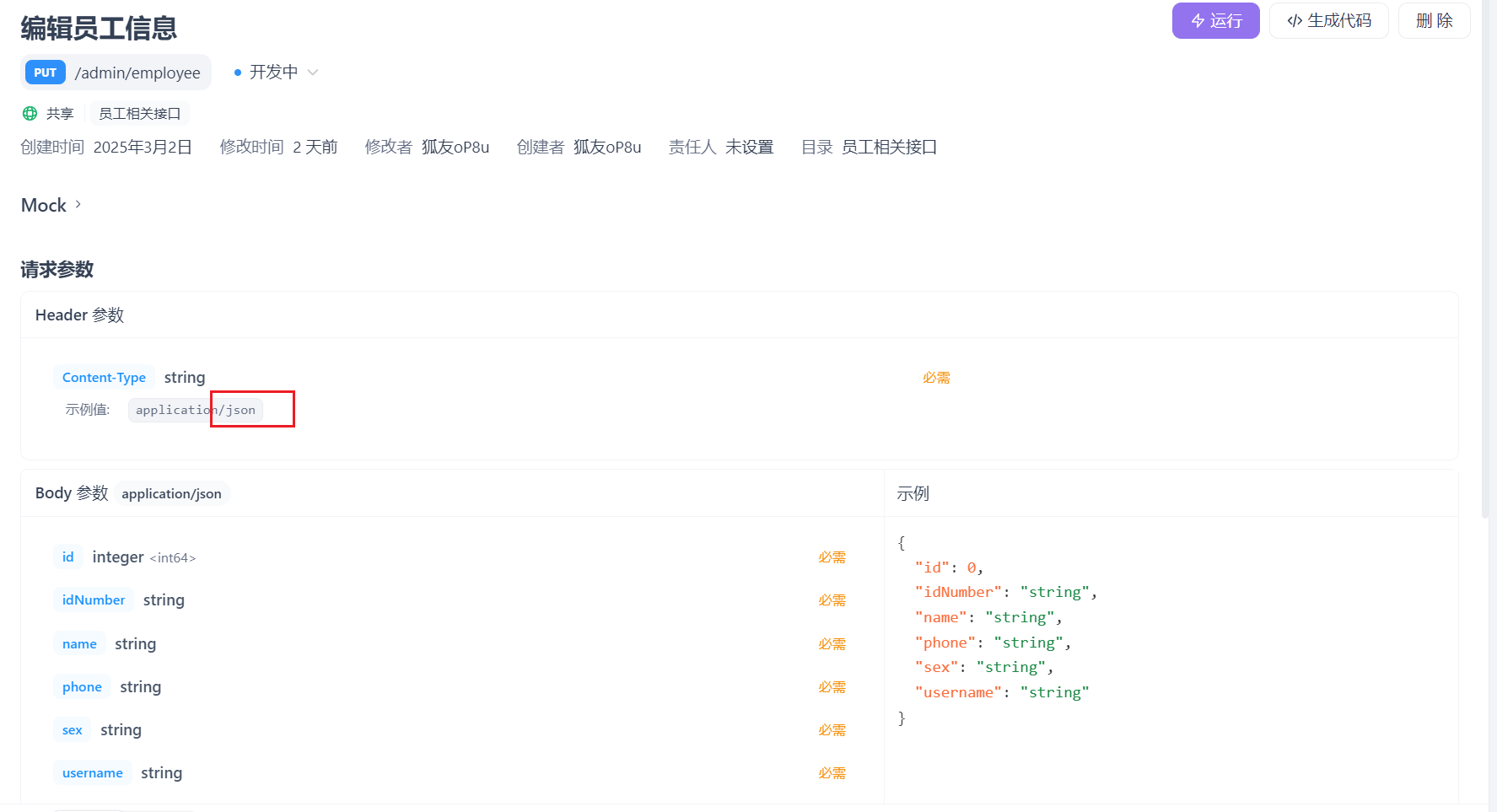
根据接口定义写控制层:
1 2 3 4 5 6 7 8 9 10 11 12 @PutMapping @ApiOperation("编辑员工信息") public Result update (@RequestBody EmployeeDTO employeeDTO) { log.info("编辑员工信息:{}" , employeeDTO); employeeService.update(employeeDTO); return Result.success(); }
业务逻辑层:
1 2 3 4 5 6 7 8 9 10 11 12 13 14 public void update (EmployeeDTO employeeDTO) { Employee employee = new Employee (); BeanUtils.copyProperties(employeeDTO, employee); employee.setUpdateTime(LocalDateTime.now()); employee.setUpdateUser(BaseContext.getCurrentId()); employeeMapper.update(employee); }
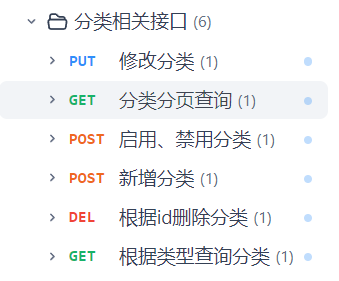
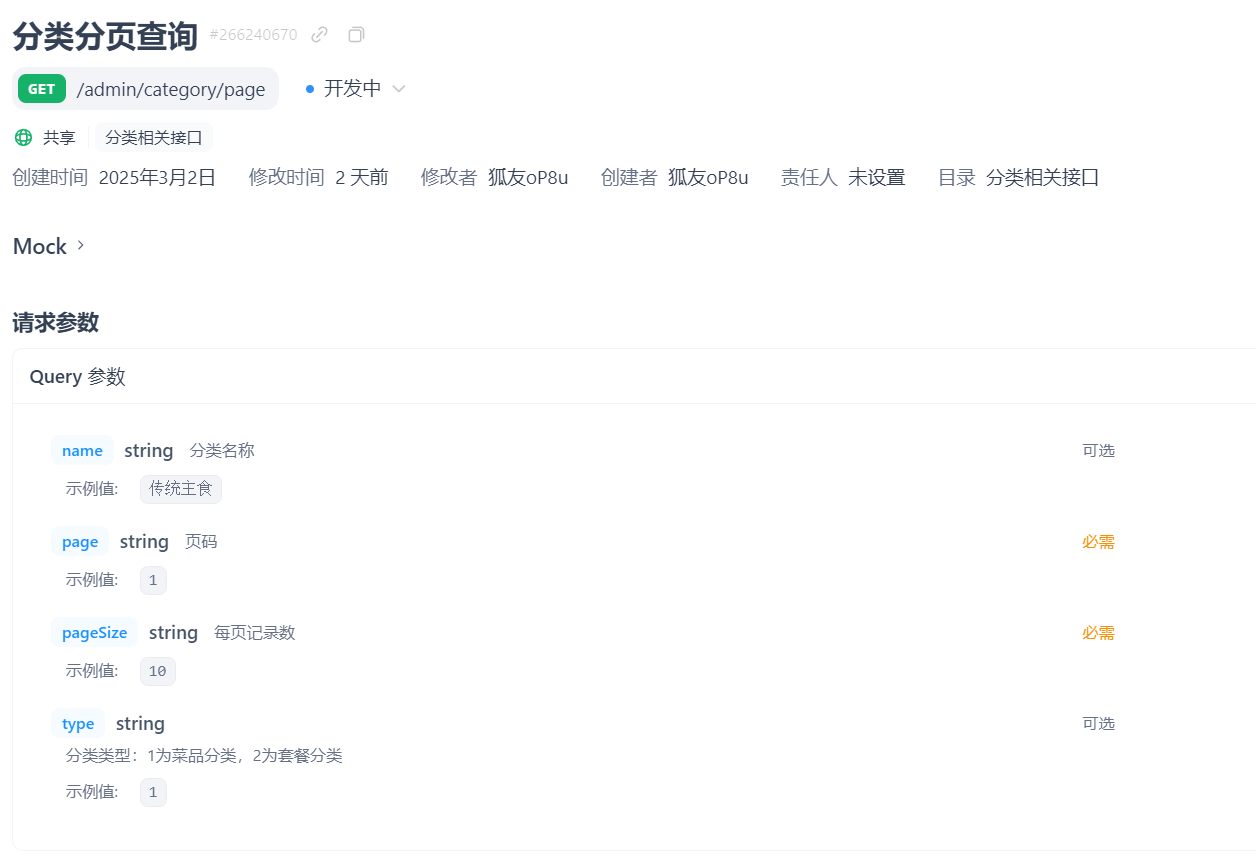
截止目前我们已经实现了员工管理模块的许多功能,后续再想想密码修改的实现。接下来我们尝试实现分类模块的功能,由于该模块的所有功能与员工管理模块大差不差,故全记录在此篇文章。
以下是我们需要实现的所有功能
x @Configuration@Slf4jpublic class WebMvcConfiguration extends WebMvcConfigurationSupport{ @Autowired private JwtTokenAdminInterceptor jwtTokenAdminInterceptor; @Autowired private JwtTokenUserInterceptor jwtTokenUserInterceptor; /** * 注册自定义拦截器 * * @param registry / protected void addInterceptors(InterceptorRegistry registry) { log.info(“开始注册自定义拦截器…”); registry.addInterceptor(jwtTokenAdminInterceptor) .addPathPatterns(“/admin/“) .excludePathPatterns(“/admin/employee/login”); registry.addInterceptor(jwtTokenUserInterceptor) .addPathPatterns(“/user/ “) .excludePathPatterns(“/user/user/login”) .excludePathPatterns(“/user/shop/status”); } /* * 通过knife4j生成接口文档 * @return / @Bean public Docket docket1() { ApiInfo apiInfo = new ApiInfoBuilder() .title(“苍穹外卖项目接口文档”) .version(“2.0”) .description(“苍穹外卖项目接口文档”) .build(); Docket docket = new Docket(DocumentationType.SWAGGER_2) .groupName(“管理端接口”) .apiInfo(apiInfo) .select() .apis(RequestHandlerSelectors.basePackage(“com.sky.controller.admin”)) .paths(PathSelectors.any()) .build(); return docket; } @Bean public Docket docket2() { ApiInfo apiInfo = new ApiInfoBuilder() .title(“苍穹外卖项目接口文档”) .version(“2.0”) .description(“苍穹外卖项目接口文档”) .build(); Docket docket = new Docket(DocumentationType.SWAGGER_2) .groupName(“用户端接口”) .apiInfo(apiInfo) .select() .apis(RequestHandlerSelectors.basePackage(“com.sky.controller.user”)) .paths(PathSelectors.any()) .build(); return docket; } private static String FILELOCATION = “C:\Users\zhangbin\Desktop\sky-take-out\sky-server\src\main\resources\uploads/“; / * * 设置静态资源映射 * @param registry / protected void addResourceHandlers(ResourceHandlerRegistry registry) { registry.addResourceHandler(“/doc.html”).addResourceLocations(“classpath:/META-INF/resources/“); registry.addResourceHandler(“/webjars/**”).addResourceLocations(“classpath:/META-INF/resources/webjars/“); // 将本地文件系统的 uploads 目录映射为 /uploads/* 的 URL registry.addResourceHandler(“/uploads/“) .addResourceLocations(“file:” + FILELOCATION); } / * 扩展spring MVC消息转换器 * @param converters */ protected void extendMessageConverters(List<HttpMessageConverter<?>> converters) { log.info(“扩展消息转换器…”); //创建一个消息转换器对象 MappingJackson2HttpMessageConverter converter = new MappingJackson2HttpMessageConverter(); //需要为消息转换器设置一个对象转换器,对象转换器可以将java对象序列化为json数据 converter.setObjectMapper(new JacksonObjectMapper()); //将自己的消息转换器加入容器中 converters.add(0,converter);//索引为0,优先使用我们自己的消息转换器 }}java
得知它的参数为一个数据传输对象DTO。
由于是新的模块,我们新建控制层CategoryController类,业务层CategoryService接口和它的实现类CategoryServiceImpl类,持久层CategoryMapper类和它的配置文件CategoryMapper.xml。
CategoryController:
1 2 3 4 5 6 7 8 9 10 11 12 13 14 15 16 17 18 19 20 21 22 23 24 25 26 @RestController @RequestMapping("/admin/category") @Slf4j @Api(tags = "分类相关接口") public class CategoryController { @Autowired private CategoryService categoryService; @GetMapping("/page") @ApiOperation("分类分页查询") public Result<PageResult> page (CategoryPageQueryDTO categoryPageQueryDTO) { log.info("分类分页查询,参数为:{}" ,categoryPageQueryDTO); PageResult pageResult = categoryService.pageQuery(categoryPageQueryDTO); return Result.success(pageResult); } }
CategoryService:
1
2
3
4
5
6
7
8
9
10
11
12
13
14
15
16
17
18
19
20
21
22
23
@Service public class CategoryServiceImpl implements CategoryService { @Autowired private CategoryMapper categoryMapper; @Override public PageResult pageQuery (CategoryPageQueryDTO categoryPageQueryDTO) { PageHelper.startPage(categoryPageQueryDTO.getPage(),categoryPageQueryDTO.getPageSize()); Page<Category> page = categoryMapper.pageQuery(categoryPageQueryDTO); long total = page.getTotal(); List<Category> list = page.getResult(); return new PageResult (total,list); } }
CategoryMapper:
1
2
3
4
5
6
7
8
9
10
@Mapper public interface CategoryMapper { Page<Category> pageQuery (CategoryPageQueryDTO categoryPageQueryDTO) ; }
CategoryMapper.xml:
1
2
3
4
5
6
7
8
9
10
11
12
13
14
15
<?xml version="1.0" encoding="UTF-8" ?> <!DOCTYPE mapper PUBLIC "-//mybatis.org//DTD Mapper 3.0//EN" "http://mybatis.org/dtd/mybatis-3-mapper.dtd" > <mapper namespace ="com.sky.mapper.CategoryMapper" > <select id ="pageQuery" resultType ="com.sky.entity.Category" > select * from category <where > <if test ="name != null and name != ''" > and name like concat('%',#{name},'%') </if > <if test ="type != null" > and type = #{type}</if > </where > order by create_time desc </select > </mapper >
特别注意: SQL 中的 WHERE 子句不支持用逗号分隔多个条件。条件之间应该用逻辑运算符(如 AND 或 OR)连接。
第三天:
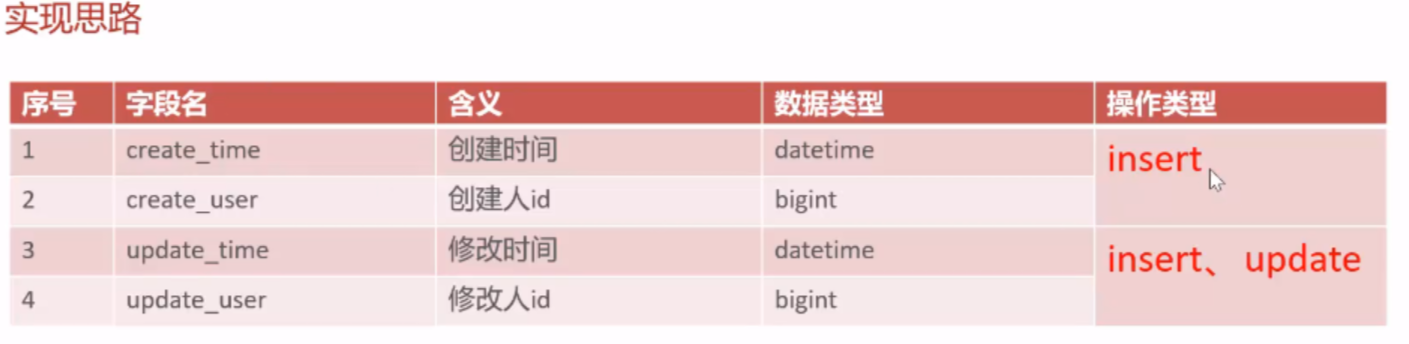
公共字段填充 注意到在修改表数据时总是会使用到createUser、updateUser和createTime、updateTime等字段,故考虑把它们抽出来单独处理。这样的思想可以归纳为aop即面向切面编程,它是一种编程范式,用于将横切关注点从业务逻辑中分离出来 ,从而提高代码的模块化、可维护性和可扩展性。
实现流程:
1.确定需要分离的点,这里的公共字段
2.自定义注解@AutoFill:用于标识需要进行统一处理的方法。
3.新建切面包,自定义切面类AutoFillAspect:统一拦截加入了AutoFill的方法,通过反射来为统一赋值
4.在Mapper层具体的方法加上AutoFill注解。
代码实现:
1.自定义AutoFill注解【只用来标识,标识那些类需要自动填充】
1.创建annotaion包用来存放自定义注解,然后创建AutoFill注解
2.添加注解@Target(ElementType.METHOD)用来说明注解是加到方法上的
3.添加@Retention(RetentionPolicy.RUNTIME)注解,保留策略为运行时
4.在注解里面指定当前数据库操作类型【可以使用枚举】【定义了之后参数列表的value就可以使用枚举类的值】
5.OperationType value();//自定义的枚举类型【里面是update和insert】
1 2 3 4 5 6 7 8 9 @Target(ElementType.METHOD) @Retention(RetentionPolicy.RUNTIME) public @interface AutoFill { OperationType value () ; }
2.自定义切面类AutoFillAspect
1.找切入点,即加上注解的方法
2.在执行这些方法执行前先执行我的这个操作(公共字段填充)
1 2 3 4 5 6 7 8 9 10 11 12 13 14 15 16 17 18 19 20 21 22 23 24 25 26 27 28 29 30 31 32 33 34 35 36 37 38 39 40 41 42 43 44 45 46 47 48 49 50 51 52 53 54 @Aspect @Component @Slf4j public class AutoFillAspact { @Pointcut("execution(* com.sky.mapper.*.*(..)) && @annotation(com.sky.annotation.AutoFill)") public void autoFillPointCut () {} @Before("autoFillPointCut()") public void autoFill (JoinPoint joinPoint) throws Throwable { log.info("开始进行公共字段填充" ); MethodSignature methodSignature = (MethodSignature) joinPoint.getSignature(); AutoFill autoFill = methodSignature.getMethod().getAnnotation(AutoFill.class); OperationType operationType = autoFill.value(); Object[] args = joinPoint.getArgs(); if (args == null || args.length == 0 ) { return ; } Object entity = args[0 ]; LocalDateTime now = LocalDateTime.now(); Long currentId = BaseContext.getCurrentId(); if (operationType == OperationType.INSERT) { Method setCreateTime= entity.getClass().getDeclaredMethod(AutoFillConstant.SET_CREATE_TIME,LocalDateTime.class); Method setCreateUser= entity.getClass().getDeclaredMethod(AutoFillConstant.SET_CREATE_USER,Long.class); Method setUpdateTime= entity.getClass().getDeclaredMethod(AutoFillConstant.SET_UPDATE_TIME,LocalDateTime.class); Method setUpdateUser= entity.getClass().getDeclaredMethod(AutoFillConstant.SET_UPDATE_USER,Long.class); setCreateTime.invoke(entity,now); setCreateUser.invoke(entity,currentId); setUpdateTime.invoke(entity,now); setUpdateUser.invoke(entity,currentId); } else if (operationType == OperationType.UPDATE) { Method setUpdateTime= entity.getClass().getDeclaredMethod(AutoFillConstant.SET_UPDATE_TIME,LocalDateTime.class); Method setUpdateUser= entity.getClass().getDeclaredMethod(AutoFillConstant.SET_UPDATE_USER,Long.class); setUpdateTime.invoke(entity,now); setUpdateUser.invoke(entity,currentId); } } }
新增菜品 实现两件事,其一完成文件上传,其二完成菜品新增
文件上传:
新增通用接口控制层:
1 2 3 4 5 6 7 8 9 10 11 12 13 14 15 16 17 18 19 20 21 22 23 24 25 26 27 28 29 30 31 32 33 34 35 36 37 38 39 40 41 42 43 44 45 46 47 48 @RestController @RequestMapping("/admin/common") @Api("通用接口") @Slf4j public class CommonController { private static String FILE_UPLOAD_PATH = "C:\\Users\\zhangbin\\Desktop\\sky-take-out\\sky-server\\src\\main\\resources\\uploads/" ; @PostMapping("/upload") @ResponseBody public Result uploadFile (@RequestParam("file") MultipartFile file) throws IOException { if (file.isEmpty()) { return Result.error("文件不能为空" ); } File dir = new File (FILE_UPLOAD_PATH); if (!dir.exists() || !dir.isDirectory()) { boolean created = dir.mkdirs(); if (created) { log.info("创建文件夹成功: {}" , FILE_UPLOAD_PATH); } else { log.warn("创建文件夹失败或已经存在: {}" , FILE_UPLOAD_PATH); } } String originalFilename = file.getOriginalFilename(); if (originalFilename == null || originalFilename.isEmpty()) { return Result.error("文件名无效" ); } Path targetLocation = Paths.get(FILE_UPLOAD_PATH).resolve(originalFilename).normalize(); try { Files.copy(file.getInputStream(), targetLocation, StandardCopyOption.REPLACE_EXISTING); log.info("文件上传成功: {}" , originalFilename); } catch (IOException e) { log.error("文件上传失败: {}" , originalFilename, e); return Result.error("文件上传失败" ); } String fileUrl = "http://localhost:8080/uploads/" + originalFilename; return Result.success(fileUrl); } }
配置类的WebMvcConfiguration类里新增静态资源映射:
1
2
3
4
5
6
7
8
9
10
11
12
13
private static String FILELOCATION = "C:\\Users\\zhangbin\\Desktop\\sky-take-out\\sky-server\\src\\main\\resources\\uploads/" ;protected void addResourceHandlers (ResourceHandlerRegistry registry) { registry.addResourceHandler("/doc.html" ).addResourceLocations("classpath:/META-INF/resources/" ); registry.addResourceHandler("/webjars/**" ).addResourceLocations("classpath:/META-INF/resources/webjars/" ); registry.addResourceHandler("/uploads/**" ) .addResourceLocations("file:" + FILELOCATION); }
新增菜品:
需要实现菜品和口味的新增:
控制层DishController:
1 2 3 4 5 6 7 8 9 10 11 12 13 14 15 16 17 18 19 20 21 22 23 24 25 @RestController @RequestMapping("/admin/dish") @Api(tags = "菜品相关接口") @Slf4j public class DishController { @Autowired private DishService dishService; @PostMapping public Result save (@RequestBody DishDTO dishDTO) { log.info("新增菜品{}" , dishDTO); dishService.saveWithFlavor(dishDTO); return Result.success(); } }
业务逻辑层DishServiceImpl:
1
2
3
4
5
6
7
8
9
10
11
12
13
14
15
16
17
18
19
20
21
22
23
24
25
26
27
28
29
30
31
32
33
34
35
@Service @Slf4j public class DishServiceImpl implements DishService { @Autowired private DishMapper dishMapper; @Autowired private DishFlavorMapper dishFlavorMapper; @Transactional public void saveWithFlavor (DishDTO dishDTO) { Dish dish = new Dish (); BeanUtils.copyProperties(dishDTO, dish); dishMapper.insert(dish); Long dishId = dish.getId(); List<DishFlavor> flavors = dishDTO.getFlavors(); if (flavors != null && flavors.size() > 0 ) { flavors.forEach(dishFlavor -> { dishFlavor.setDishId(dishId); }); dishFlavorMapper.insertBatch(flavors); } } }
菜品的新增直接在Mapper层的配置文件写插入语句即可。
口味的新增Mapper层的配置文件写动态sql
1 2 3 4 5 6 <insert id ="insertBatch" > insert into dish_flavor (dish_id, name, value) VALUES <foreach collection ="flavors" item ="df" separator ="," > (#{df.dishId},#{df.name},#{df.value}) </foreach > </insert >
遇到的问题:
1.老师提供的oss已无法使用,本地存储解决
但是在使用value注解的时候没办法替换yml文件里的属性,直接写的变量解决,但是导致直接写的路径很长而且修改麻烦。
2.复制DishMapper的时候复制了autofill注解到DishFlavorMapper导致报错,去掉即可。
3.数据库的字段名和实体的字段名别搞混淆。
批量删除菜品 考虑菜品是否可以删除:
1.是否存在起售中的菜品
2.是否存在关联到套餐的菜品
修改菜品基本信息和口味数据 1.查询菜品分类(已实现)
2.图片上传和回显菜品图片(已实现)
3.根据id查询菜品—简单
4.修改菜品
注意口味数据可以先删除再新增以达到修改的效果。

 一个是修改员工信息